
I opened my email Thursday morning and saw it: “Two-factor (2FA) – Activation Required” from MetaMask.
My stomach dropped for about three seconds.
Not because I was worried about my account. But because I know how many people are going to click that link.
It’s not from MetaMask. It’s a scam. A sophisticated one. And if you use MetaMask for your DeFi positions, your LP tokens, or anything else—you need to know how to spot this before you lose everything.
Here’s the email I received, and here’s why I didn’t click the big blue button that probably would have cost me everything in my wallet.
The Email That Should Raise Every Red Flag
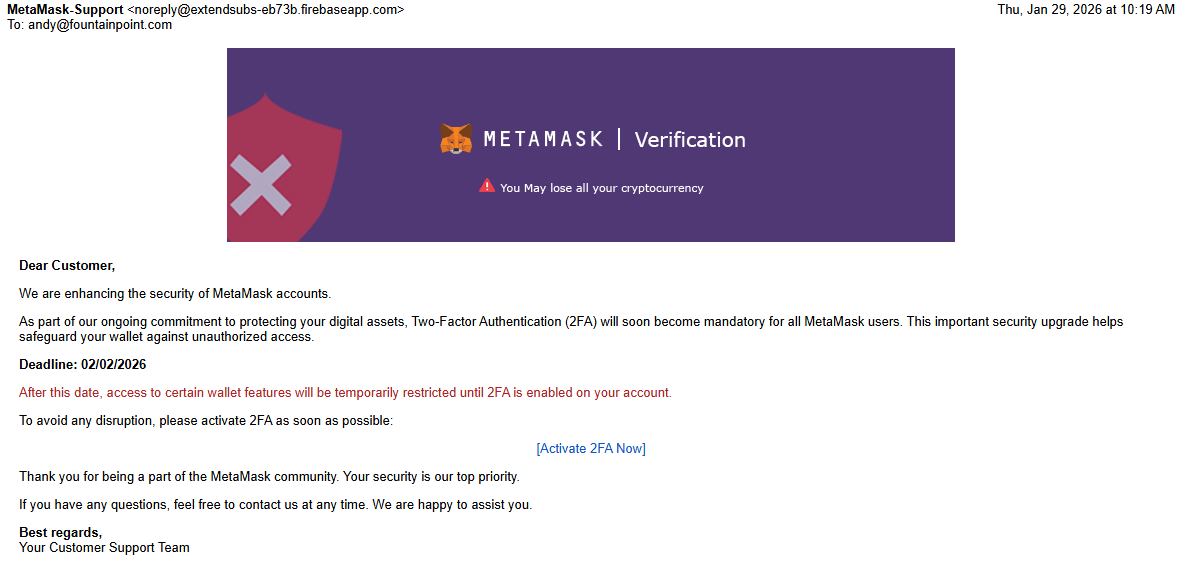
Let me walk you through what landed in my inbox:
Subject: “[FWD] Two-factor (2FA) – Activation Required”
From: MetaMask-Support noreply@extendsubs-eb73b.firebaseapp.com
The Message: “We are enhancing the security of MetaMask accounts. As part of our ongoing commitment to protecting your digital assets, Two-Factor Authentication (2FA) will soon become mandatory for all MetaMask users.”
Then comes the pressure: “Deadline: 02/02/2026” followed by the threat that “access to certain wallet features will be temporarily restricted until 2FA is enabled.”
And finally, the big blue button: [Activate 2FA Now]
At first glance? It looks legitimate. The MetaMask logo is right. The language sounds official. The concern seems reasonable—of course a crypto wallet should require 2FA.
But here’s the thing: This email is designed to steal your seed phrase and drain your wallet completely.
Let me show you how I knew it was a scam within 30 seconds of reading it.
The Five Red Flags I Spotted Immediately
Red Flag #1: The Sender Domain Is Completely Wrong
Look at that email address again: noreply@extendsubs-eb73b.firebaseapp.com
MetaMask is owned by ConsenSys, a major blockchain company worth billions. Their legitimate emails come from @metamask.io or @consensys.net.
They do NOT send official security notices from a random Firebase subdomain that looks like someone spun up a free web app in their basement.
“extendsubs-eb73b” screams “I registered this domain 48 hours ago specifically to run this scam.”
What the real domain looks like: support@metamask.io or notifications through the MetaMask app itself.
If the email domain doesn’t match the company’s official website domain, it’s a scam. Period.
Red Flag #2: “Dear Customer” Instead of Any Personal Identifier
Real companies—especially financial services companies—use some form of identifier in their emails.
MetaMask knows your wallet address. At minimum, a legitimate email would reference it: “Dear user with wallet 0x7a3f…” or at least use the email address you registered with.
“Dear Customer” is the calling card of mass phishing campaigns. They sent this to 50,000 email addresses scraped from data breaches. They don’t know if you even have a MetaMask wallet.
Translation: This email was sent to everyone hoping a percentage would click.
Red Flag #3: The Artificial Urgency
“Deadline: 02/02/2026”
“After this date, access to certain wallet features will be temporarily restricted”
This is Phishing 101: create panic, force quick decisions, prevent the target from thinking clearly.
Real security updates don’t work this way. When major platforms implement mandatory security features, they:
- Announce it well in advance through multiple channels
- Give you months, not days
- Explain exactly what features are affected
- Provide detailed instructions with screenshots
They don’t send you a single email with a 4-day deadline and a mysterious button.
Red Flag #4: The Vague Call-to-Action Button
See that “[Activate 2FA Now]” button? Notice what’s missing?
The actual URL.
In the email, it’s just a hyperlink. You can’t see where it actually goes without hovering over it (and even that can be spoofed in HTML emails).
A legitimate security email would either:
- Tell you to go directly to MetaMask.io and log in
- Provide the exact URL in plain text you can verify
- Direct you to activate 2FA inside the MetaMask extension itself
They would never hide the destination behind a vague button in an email about security.
Red Flag #5: MetaMask Doesn’t Actually Work This Way
Here’s the thing about MetaMask: It’s a browser extension and mobile app. It doesn’t have “accounts” that require email-based 2FA.
MetaMask’s security model is completely different:
- Your wallet is secured by your seed phrase (12 or 24 words)
- Optional password protection on the extension
- Hardware wallet integration (Ledger, Trezor) for transaction signing security, not traditional 2FA
- Biometric authentication on mobile
MetaMask doesn’t have a centralized authentication system that would require email-based 2FA activation. That’s not how non-custodial wallets work.
If you don’t understand how your security actually works, you’re vulnerable to any scam that sounds technical enough.
How This Scam Actually Works (The Opportunity Angle—For Scammers)
Let’s follow the scammer’s playbook. What happens if you click that button?
Step 1: The link takes you to a website that looks exactly like MetaMask.io. Same logo, same colors, same layout. The URL might be something like:
metamask-verify.commetamask-security.netmeta-mask.io(note the hyphen)
Step 2: The fake site tells you that to “activate 2FA,” you need to “verify your wallet.” This is where they get you.
Step 3: They present a form asking for your 12-word or 24-word seed phrase “to confirm your identity.”
Step 4: The moment you enter your seed phrase, it’s over. The scammers now have complete control of your wallet. They don’t need your password. They don’t need your computer. They have the master key.
Step 5: Within minutes (sometimes seconds), they:
- Transfer all your ETH, tokens, and NFTs to their wallets
- Drain your LP positions
- Remove any staked assets they can access
- Empty everything of value
Step 6: You realize what happened when you check your wallet and see a balance of zero.
There’s no undo button. No customer service to call. No bank to reverse the transaction. Your money is gone, and it’s never coming back.
The brutal math: These scams work because they only need a 1-2% success rate to be wildly profitable. Send 100,000 emails. Get 1,000 clicks. Get 200 people to enter seed phrases. Average $500 stolen per wallet = $100,000 payday.
From the scammer’s perspective, this is a numbers game with excellent returns.
The Real Risk: Why This Scam Is So Dangerous
Let me be blunt about what’s at stake here.
Your MetaMask wallet is not a bank account. There is:
- No FDIC insurance
- No fraud protection
- No customer service that can reverse transactions
- No recovery process if your seed phrase is compromised
When your seed phrase is stolen, everything connected to that wallet is gone:
- Your cryptocurrency holdings
- Your LP positions (like the ones I use Krystal for)
- Your staked assets
- Your NFTs
- Any tokens you’re holding for long-term appreciation
Real numbers from similar scams:
In 2023, crypto phishing attacks stole over $295 million from users, according to Chainalysis. The average victim lost approximately $4,500. Some lost six figures.
The most common entry point? Phishing emails that looked legitimate.
A personal example: I use MetaMask to interact with Krystal for my liquidity providing experiments. My current positions—small as they are—represent my “extinction budget” for DeFi learning. If I had clicked that link and entered my seed phrase, those positions would be gone. The ETH in LPs. The token pairs I’m providing liquidity for. All of it.
And here’s the worst part: I’d have no one to call. MetaMask can’t help you if you voluntarily gave away your seed phrase. That’s the trade-off of self-custody.
The risk isn’t theoretical. It’s mathematical certainty. If scammers get your seed phrase, they will drain your wallet. Not “might.” Will.
What MetaMask Actually Does About Security
So how does MetaMask really handle security communications? Because understanding this is your best defense.
Legitimate MetaMask security practices:
- In-app notifications: Real security updates appear inside the MetaMask extension or mobile app when you open it. They don’t rely on email.
- Official blog announcements: Major security changes are announced at
metamask.io/newsorconsensys.net/blogwith detailed explanations. - No seed phrase requests: MetaMask will NEVER, under any circumstances, ask for your seed phrase. Not via email, not via DM, not via support ticket. Never.
- Hardware wallet integration: Real 2FA for MetaMask means connecting a Ledger or Trezor hardware wallet. Not email-based authentication codes.
- Verified communication channels:
- Official website:
metamask.io(no hyphens, no subdomains) - Official Twitter: @MetaMask (blue checkmark)
- Official support:
support.metamask.io(and they’ll never DM you first)
- Official website:
The official MetaMask security documentation (available at support.metamask.io/privacy-and-security) explicitly warns:
- Never share your seed phrase
- MetaMask Support will never ask for your seed phrase
- Be wary of phishing attempts via email or social media
If you receive an email claiming to be from MetaMask about required security actions, the official response is: Go directly to metamask.io, ignore the email, and verify through official channels.
The Checklist: How to Spot Crypto Wallet Phishing
Here’s your quick-reference guide for the next time you get an email from “your crypto wallet”:
Before You Click Anything:
- Check the sender domain carefully. Does it exactly match the company’s official website? Not close—exact.
- Hover over links (don’t click) to see the real URL. Does it go to the official domain or something suspicious?
- Look for grammar and spelling errors. Legitimate companies employ copyeditors. Scammers don’t.
- Evaluate the urgency. Are they pressuring you to act immediately? Red flag.
- Verify through official channels. Open a new browser tab, type the official URL yourself, and check for announcements.
NEVER, Under Any Circumstances:
- Enter your seed phrase on ANY website. Not even the “real” site. You should only see your seed phrase when you’re setting up a new wallet or restoring from backup on a device you control.
- Click links in unsolicited security emails. Go directly to the source.
- Trust a security warning that arrives only via email. Real security issues are announced through multiple channels.
- Assume the email is legitimate because it looks professional. Scammers are good at graphic design too.
Do This Right Now:
- Enable real 2FA through your MetaMask app settings. Connect a hardware wallet if you have significant holdings.
- Bookmark official sites (
metamask.io,krystal.app, etc.) to avoid typosquatting domains. - Set up a separate email for crypto accounts to reduce exposure in data breaches.
- Write down your seed phrase and store it offline in a secure location—not in your email, not in cloud storage.
The Golden Rule: If you’re unsure whether a security email is legitimate, treat it as a scam until proven otherwise. The cost of assuming it’s fake (a few minutes of verification) is tiny compared to the cost of assuming it’s real (losing everything).
What I Actually Did (And What You Should Do)
When I received this email, here’s exactly what I did:
1. I didn’t click anything. Not the link. Not the button. Not even to “see where it goes.” Clicking can trigger tracking pixels that confirm your email is active.
2. I opened a new browser tab and went directly to metamask.io. I typed the URL myself. No Google search. No clicking bookmarks. Direct navigation.
3. I checked the official MetaMask Twitter and blog. Zero announcements about mandatory 2FA by February 2nd. Zero mentions of email-based verification. Confirmed: scam.
4. I logged into my actual MetaMask extension (on my computer where it’s installed) and verified my security settings. Everything was normal. No warnings, no restrictions, no urgent actions needed.
5. I reported the phishing email. Forwarded it to phishing@metamask.io (yes, they have an official address for this) and reported it to my email provider.
6. I checked my actual wallet security. Made sure my seed phrase was still stored offline, not in any digital format. Verified that I hadn’t connected my wallet to any suspicious DApps recently.
7. I took a screenshot for this blog post. Because if I got this email, hundreds of thousands of other people did too.
What you should do if you receive this (or similar) emails:
Immediately:
- Delete the email without clicking anything
- Go directly to the official website to verify your account
- Check official social media channels for any real security announcements
Within 24 hours:
- Review your wallet’s recent transaction history for anything suspicious
- Audit which DApps have permissions to interact with your wallet (you can revoke these at
revoke.cash) - Consider moving to a new wallet if you’re concerned your current one is compromised
Ongoing:
- Set up a hardware wallet for any holdings above your “extinction budget”
- Use a dedicated email address for crypto accounts
- Enable email filtering rules for crypto-related services
- Stay educated on common scam patterns
Did You Already Click? What to Do Right Now
If you clicked the link and entered your seed phrase, you need to act in the next 5-10 minutes. Not tomorrow. Not after you finish reading this. NOW.
Emergency response checklist:
1. Create a new wallet immediately. Download MetaMask on a secure device and generate a completely new wallet with a new seed phrase.
2. Transfer everything out of the compromised wallet to your new wallet. Move:
- All cryptocurrency
- All tokens
- All NFTs
- Exit all LP positions
- Withdraw all staked assets
3. Revoke all DApp permissions from the old wallet at revoke.cash. Enter your compromised wallet address and revoke everything.
4. Accept that you’re in a race. The scammers have your seed phrase. They may be draining your wallet while you’re reading this. Speed is everything.
5. Don’t send anything back to the compromised wallet. It’s burned. Consider the seed phrase public information.
If assets are already gone:
- Document everything: timestamps, transaction hashes, amounts stolen
- Report it to the FBI’s IC3 (ic3.gov) and local law enforcement
- Report it to the exchange where you purchased the crypto (if applicable)
- Accept that recovery is unlikely but reporting helps establish patterns
The brutal truth: Once your seed phrase is compromised, that wallet is permanently unsafe. Even if you move everything out, you can never use that seed phrase again. Generate a new one.
Bottom Line: Your Seed Phrase Is the Keys to the Kingdom
Here’s what I need you to understand: These scams are getting more sophisticated. The fake websites look perfect. The emails use official logos and professional language. The urgency feels real.
But the fundamentals haven’t changed:
No legitimate crypto company will EVER ask for your seed phrase via email, support ticket, Discord DM, Telegram message, or any other communication method.
Your seed phrase is the master key. Whoever has it owns your wallet. There’s no second layer of security. No “verify it’s really you” step. No fraud protection. The seed phrase IS the authority.
This is why crypto adoption is hard. The security burden is entirely on you. There’s no customer service to call when you get scammed. No bank to reverse the transaction. No insurance to cover your losses.
You are your own bank, which means you’re also your own security team, your own fraud prevention department, and your own last line of defense.
When in doubt, go directly to the source. Type the URL yourself. Verify through official channels. Treat every unsolicited security email as a scam until you’ve independently confirmed it’s legitimate.
The five seconds it takes to verify could save you thousands of dollars and months of regret.
Your move: If you have a MetaMask wallet (or any crypto wallet), take 15 minutes today to:
- Verify your seed phrase is stored offline securely
- Check your wallet permissions at revoke.cash
- Review your security settings
- Set up hardware wallet 2FA if you have significant holdings
- Bookmark official sites to avoid fake domains
Don’t wait until you get a phishing email to think about security. By then, you’re making decisions under pressure. Make the decisions now, when your head is clear.
Disclaimer
This is not financial, tax, or legal advice. It’s me telling you about a specific scam I received and how I identified it. Your situation may differ.
If you received this exact email: DELETE IT. Do not click any links. Do not enter your seed phrase anywhere. Go directly to metamask.io to verify your account security.
I’m not affiliated with MetaMask, ConsenSys, or any crypto security company. I’m just a guy who uses DeFi platforms for small experiments and wants to make sure you don’t lose your money to scammers.
If you’re unsure about anything crypto-security-related, consult with a cybersecurity professional or use official support channels for your specific platform. [Or, reach out to the Patient Investor on the right margin. They can help with these types of things, if necessary.]
Stay safe out there. The scammers are betting you’ll click first and think later. Prove them wrong.


