Creating attention-grabbing titles for crypto blogs can be tricky, but this time, my story is straightforward—it’s about my experience setting up a Phantom Wallet and exploring the world of Solana. With the help of my ever-patient crypto mentor (aka “the guru”), I took my first steps into this new ecosystem. Here’s a breakdown of my journey, challenges, and lessons learned.
The Beginning: Enter the Phantom (Wallet)
Last week, my crypto mentor introduced me to the Phantom Wallet while discussing the Solana ecosystem. He casually mentioned, “We need to get you on Solana and set you up with a Phantom Wallet.” Intrigued and a little nervous, I agreed to dive in.
On Wednesday, we met virtually, and with his guidance (and a lot of patience), I tackled the setup process. Here’s what we accomplished:
- Downloading Phantom:
I installed the Phantom Wallet extension for Chrome.
– I opted to use the same seed phrase as another wallet I already had. - Converting Crypto:
At Coinbase, I converted a portion of my Ethereum (ETH) into Solana (SOL).
– Thankfully, I mostly remembered how to navigate Coinbase from past experiences, with occasional nudges from the guru. - Transferring SOL to the Phantom Wallet:
When it was time to transfer the SOL into my Phantom Wallet, I hit a mental block.
– My mentor patiently guided me through the process via Zoom. We started by sending just $1 worth of SOL as a test. Once that worked, we transferred the rest.
– I appreciated the extra precautions my mentor took to ensure the transfer was safe. He respected my money, and that meant a lot.
The Excitement: Using My New Wallet
With my Phantom Wallet funded, I was eager to start using it. I quickly stumbled upon an opportunity on Orca, a popular decentralized exchange on Solana. Orca’s SOL/USDC liquidity pool caught my eye, and I decided to dive in.
But things didn’t go as smoothly as I hoped.
The Problem: Phantom vs. Metamask
When I tried to use Phantom with Orca, I ran into issues. My wallet wasn’t working properly. That’s when the guru pointed out that Phantom and Metamask (another wallet I’d been using) sometimes don’t play well together on the same Chrome profile. This was news to me!
Here’s how we solved it:
- Creating a New Chrome Profile:
– I made a fresh Chrome profile and installed Phantom again.
– I didn’t delete my Phantom Wallet from the original profile right away. Deleting a crypto wallet full of funds can invite disaster if something goes wrong! The guru joked it would be “fun,” but I wasn’t taking any chances. - Re-setting Up Phantom:
– I used my seed phrase to recover my wallet in the new Chrome profile.
– Once the new wallet was functional, I removed it from the original profile.
The Reward: Success on Orca
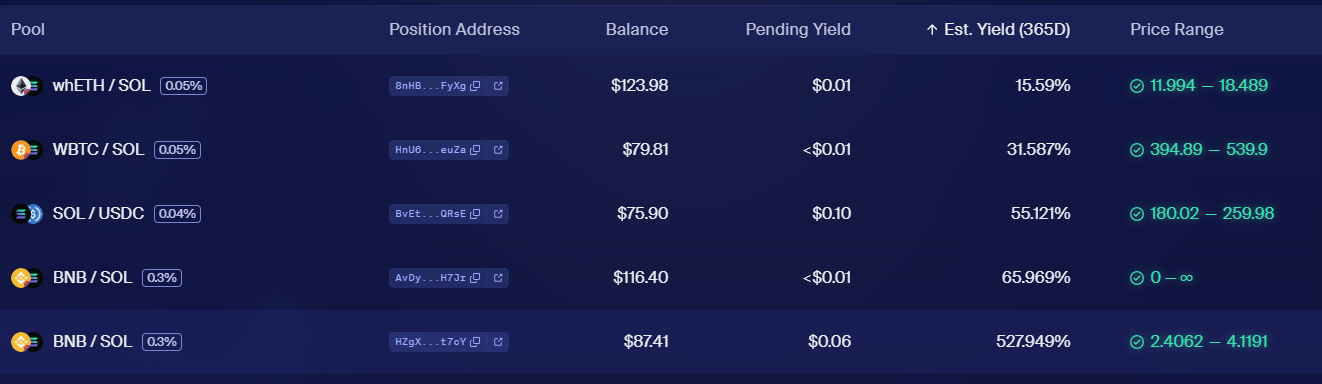
After setting up Phantom in the new profile, I returned to Orca. My mentor walked me through the extra steps needed to create a position in the liquidity pool. It took a few clicks, but I finally managed to secure my first position on Orca.
Key Takeaways
- Seed Phrases Are Key: Always safeguard your seed phrase. It’s your lifeline for recovering wallets.
- Be Cautious with Wallets: Avoid deleting wallets unnecessarily. Even with a seed phrase, it’s best to proceed cautiously.
- Profiles Matter: If you’re using multiple wallets like Metamask and Phantom, consider creating separate browser profiles to avoid conflicts.
- Patience Pays Off: With a little guidance and persistence, even complicated tasks can become manageable.
Final Thoughts
Setting up a Phantom Wallet and diving into the Solana ecosystem felt like a big step, but it was worth it. I now have a functional wallet, a position in a liquidity pool on Orca, and a better understanding of how these tools work together.
If you’re new to crypto or exploring Solana, don’t hesitate to ask for help from a mentor or trusted friend. With the right guidance, the process becomes much more approachable—and even fun!